
Entourage responding too slow
Too many mails in your inbox.
How it impacts: Every time when send & receive runs on your machine, it takes time to sync depending on number of mails on the exchange server.
Fix: You need to move mails from your exchange/POP/IMAP account to your computer folder.
Process: In order to fix this follow the following steps:
a. Launch Entourage.
b. Select the mails that you want to move from exchange to your computer. You can use command key to select multiple items.
c. Now drag those folders to "On My Computer" folder in Entourage.
d. If you want to add sub folders under "On My Computer", just use contextual menu on this folder.
Just like the mails you can also copy the whole inbox in "On My Computer" folder.
Please Note: Once you move those mails from your inbox, it is moved from the server so you will not be able to check those mails from anywhere else, i.e. from any other machine.
Other useful steps could be Archiving the mails to Macintosh HD or any other storage device or you can also create rules to delete certain certain items from the inbox automatically.
Showing posts with label Entourage 2008. Show all posts
Showing posts with label Entourage 2008. Show all posts
Friday, May 15, 2009

STOP OUTGOING MAILS AFTER REBUILD
After Rebuild Entourage starts resending old mails
Working at a help desk we use to get this issue that sometimes after rebuilding database Entourage starts sending old mails (upto one year old) to the users added in the contact list.
Though it took really long time but finally we reached to the conclusion, "The reason is not that rebuild is unsuccessful but it is due to the duplicate identity that is created while creating the database." This duplicate identity is selected in the place of main identity in Entourage and all you need to do is just change it to the default original identity what it should be and it will stop sending the mails.
Source
Working at a help desk we use to get this issue that sometimes after rebuilding database Entourage starts sending old mails (upto one year old) to the users added in the contact list.
Though it took really long time but finally we reached to the conclusion, "The reason is not that rebuild is unsuccessful but it is due to the duplicate identity that is created while creating the database." This duplicate identity is selected in the place of main identity in Entourage and all you need to do is just change it to the default original identity what it should be and it will stop sending the mails.
Source
ENTOURAGE TROUBESHOOTING: COMPOSING MAIL
Partial mail vanishes while composing
This seems to be, though it is actually not a problem.
MS office has enabled Entourage with a feature that allows the user to highlight a portion of the original message and then when you forward or reply, it only brings that part that's highlighted into the new message. In order to fix this all you have to do is don't highlight anything in the original message and it will all appear in the new message or otherwise if you want, you can use this feature here onwards.
Source
This seems to be, though it is actually not a problem.
MS office has enabled Entourage with a feature that allows the user to highlight a portion of the original message and then when you forward or reply, it only brings that part that's highlighted into the new message. In order to fix this all you have to do is don't highlight anything in the original message and it will all appear in the new message or otherwise if you want, you can use this feature here onwards.
Source
MANAGING THE DELEGATES
How to manage the delegatory access?
1. Open Entourage and click on Mail icon.
2. On the left side in the folder list, select Calendar, Address book, inbox folder that you want to change access for.
3. Now come on Edit menu, select Folder Properties & then click the tab that says Permissions.
4. Select the user (ofcourse name) whom you want to change the permissions for.
5. Here you will find Permission Level pop-up, define the access level that you want to grant this user.
If you want to know details of delegatory access and study other troubleshooting steps please refer Mactopia.
1. Open Entourage and click on Mail icon.
2. On the left side in the folder list, select Calendar, Address book, inbox folder that you want to change access for.
3. Now come on Edit menu, select Folder Properties & then click the tab that says Permissions.
4. Select the user (ofcourse name) whom you want to change the permissions for.
5. Here you will find Permission Level pop-up, define the access level that you want to grant this user.
If you want to know details of delegatory access and study other troubleshooting steps please refer Mactopia.
Tuesday, May 5, 2009
Friday, April 24, 2009
ENTOURAGE IN SPOTLIGHT
Now use Spotlight feature for Entourage
As soon as you get 11.2.3 Update installed on your OS X, Spotlight feature is ready to execute searches in your Entourage database contents. Spotlight has the capability to search and locate the mail from your Entourage regarless of where it is. You can find any item (to specify Email, Notes and Schedules) related to any kind of mail account (POP, IMAP or Exchange) which could be saved inside your Entourage database. Spotlight can search all folders of all types be it of any type of mail account. So now without browsing to search option in Entourage you can find data in all locations across all folders in Entourge, hence making you work faster then ever.Now get the things done faster than you have been doing, the best way to impress for your boss.
Here is the setting that needs to be done:
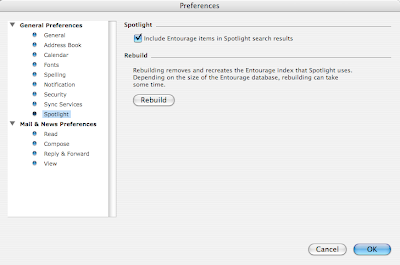
Once selected, you will be able to use this option.
On this window you will find a button that says Rebuild. If we select REMOVE AND RECREATE Entourage index that spotlight that Spotlight uses. If the database is too long then this process might take some time.
Rebuilding process starts as soon as you press this button (pressing ‘OK’ button at the bottom of that window is not required). I would recommended to rebuild your cache if you continue to see difference between what you have in Entourage and what Spotlight finds for you.
Now here it comes- you will find all the mails that you have deleted in last 30 days.
Select the mails those you want to be recovered and it will go to the folder where it was deleted from.
Need further assistance and information? Click here.
As soon as you get 11.2.3 Update installed on your OS X, Spotlight feature is ready to execute searches in your Entourage database contents. Spotlight has the capability to search and locate the mail from your Entourage regarless of where it is. You can find any item (to specify Email, Notes and Schedules) related to any kind of mail account (POP, IMAP or Exchange) which could be saved inside your Entourage database. Spotlight can search all folders of all types be it of any type of mail account. So now without browsing to search option in Entourage you can find data in all locations across all folders in Entourge, hence making you work faster then ever.Now get the things done faster than you have been doing, the best way to impress for your boss.
Here is the setting that needs to be done:

Once selected, you will be able to use this option.
On this window you will find a button that says Rebuild. If we select REMOVE AND RECREATE Entourage index that spotlight that Spotlight uses. If the database is too long then this process might take some time.
Rebuilding process starts as soon as you press this button (pressing ‘OK’ button at the bottom of that window is not required). I would recommended to rebuild your cache if you continue to see difference between what you have in Entourage and what Spotlight finds for you.
Need further assistance and information? Click here.
Wednesday, April 1, 2009
SETTING UP OUT OF OFFICE REPLY IN ENTOURAGE 2008
How to set up Out of Office reply
If you have Entourage 2004 then unfortunately you cannot do it. If you have an Exchange account then you can use webmail to set this up. For POP and IMAP account there is a work around for setting OOO/OOOR, if you can download a third party application, you would be able to set out of office reply with the help of that, but again make sure that you should have Mac OS 10.4 or later version.
If you have upgraded it to Entourage 2008 then you can easily configure this in your Rules. Here are the steps to set this up:
How to turn ON out of office reply:
1. Launch your Entourage 2008.
2. Go to the Tools menu and click Out of Office. Select Send 'Out of Office messages'.
3. Under the 'Reply to message' with box, define the text that you want to be sent as reply.
How to turn OFF out of office reply:
1. Launch your Entourage 2008.
2. Go to the Tools menu and click Out of Office.
3. Select 'Do not Send Out of Office messages'.
Just wanted to tell you that your deligates cannot set ON or OFF out of office reply for you.
.
If you have Entourage 2004 then unfortunately you cannot do it. If you have an Exchange account then you can use webmail to set this up. For POP and IMAP account there is a work around for setting OOO/OOOR, if you can download a third party application, you would be able to set out of office reply with the help of that, but again make sure that you should have Mac OS 10.4 or later version.
If you have upgraded it to Entourage 2008 then you can easily configure this in your Rules. Here are the steps to set this up:
How to turn ON out of office reply:
1. Launch your Entourage 2008.
2. Go to the Tools menu and click Out of Office. Select Send 'Out of Office messages'.
3. Under the 'Reply to message' with box, define the text that you want to be sent as reply.
How to turn OFF out of office reply:
1. Launch your Entourage 2008.
2. Go to the Tools menu and click Out of Office.
3. Select 'Do not Send Out of Office messages'.
Just wanted to tell you that your deligates cannot set ON or OFF out of office reply for you.
.
Subscribe to:
Posts (Atom)


 Posts


