
Unable to open Entourage
Sometimes you try to open Entourage and it crashes at soon as it is launched. In this case though there could be various reasons one of them is "Schedule" that could create the problem.
To fix this we need to stop schedules at the time of launching Entourage.
Hold down "Shift" key and launch the application and this will stop schedules from launching, if by doing this the application is not crashing that means issue is with schedules and you need to find and delete the schedule that is creating Entourage to crash.
Further troubleshooting Entourage by Microsoft.
Source
Showing posts with label Entourage Crashing. Show all posts
Showing posts with label Entourage Crashing. Show all posts
Friday, April 24, 2009

Thursday, April 9, 2009
PREVENT THE CRASH
Entourage Crashing and closing automatically
Sometimes it might happen that as soon as you launch Entourages it closes down and not allows you to work. This might happen due to permissions and can be fixed by repairing disk permissions. Here is the process to repair it:
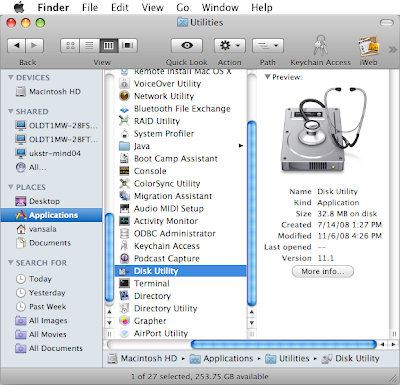
1. Go to Applications & launch Utilities.
2. Under Utilities, open Disk Utility.
3. On this screen, there is list of the Drives attached to the machine.
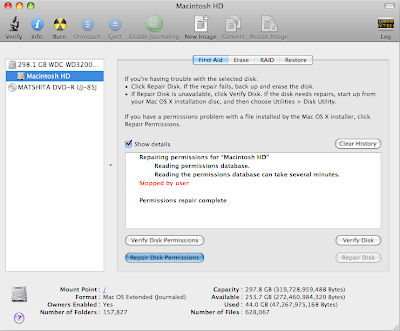
4. Select the hard drive in which application is installed and click on Verify Disk Permissions.
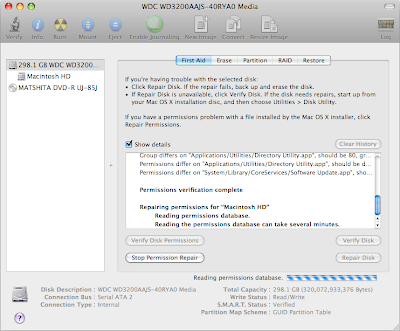
5. Once done, click on Repair Disk Pemissions and this process might take a while so gulp a coke while it finishes.
Once this process is complete restart the machine and then try to launch Entourage and it should work fine.
.
Sometimes it might happen that as soon as you launch Entourages it closes down and not allows you to work. This might happen due to permissions and can be fixed by repairing disk permissions. Here is the process to repair it:

1. Go to Applications & launch Utilities.
2. Under Utilities, open Disk Utility.
3. On this screen, there is list of the Drives attached to the machine.

4. Select the hard drive in which application is installed and click on Verify Disk Permissions.

5. Once done, click on Repair Disk Pemissions and this process might take a while so gulp a coke while it finishes.
Once this process is complete restart the machine and then try to launch Entourage and it should work fine.
.
Subscribe to:
Posts (Atom)


 Posts
Posts


