
Archiving through Entourage Email Archive X 4.1.0
If you are looking for high end archiving to transfer the mails to the machine so that you can search them using spotlight to locate the file/mail. Technically addressed as EEAX, this has fuction of archiving the file in many diffferent formats and is completely Unicode compliant. You can download this script from here.
Source
Friday, April 24, 2009

AUTO LAUNCH ENTOURAGE
Set up Entourage to launch automatically when you login
If Entourage is an essential application for you and you use it as an important tool for your business, then this post could be of great help for you. I am mentioning the setup procedure to launch Entourge at the time of login.
1. Go to "System Preferences".
2. Select "Accounts".
3. In Accounts window, select you name.
4. Open the "Login Items" and add click on "+" icon.
5. Browse and add Entourage as its default location is in Applications > Microsoft Office 2004 (or 2008) > Entourage.
6. Once you add the application, come out of Accounts window and re-login to the machine to check if it is working fine.
I suggest new users a simple way i.e. just launch Entourage and then hold the icon on the dock, you will get an option of Open at Login, just select it and it is done.
If Entourage is an essential application for you and you use it as an important tool for your business, then this post could be of great help for you. I am mentioning the setup procedure to launch Entourge at the time of login.
1. Go to "System Preferences".
2. Select "Accounts".
3. In Accounts window, select you name.
4. Open the "Login Items" and add click on "+" icon.
5. Browse and add Entourage as its default location is in Applications > Microsoft Office 2004 (or 2008) > Entourage.
6. Once you add the application, come out of Accounts window and re-login to the machine to check if it is working fine.
I suggest new users a simple way i.e. just launch Entourage and then hold the icon on the dock, you will get an option of Open at Login, just select it and it is done.
SCHEDULING NO SCHEDULE
Unable to open Entourage
Sometimes you try to open Entourage and it crashes at soon as it is launched. In this case though there could be various reasons one of them is "Schedule" that could create the problem.
To fix this we need to stop schedules at the time of launching Entourage.
Hold down "Shift" key and launch the application and this will stop schedules from launching, if by doing this the application is not crashing that means issue is with schedules and you need to find and delete the schedule that is creating Entourage to crash.
Further troubleshooting Entourage by Microsoft.
Source
Sometimes you try to open Entourage and it crashes at soon as it is launched. In this case though there could be various reasons one of them is "Schedule" that could create the problem.
To fix this we need to stop schedules at the time of launching Entourage.
Hold down "Shift" key and launch the application and this will stop schedules from launching, if by doing this the application is not crashing that means issue is with schedules and you need to find and delete the schedule that is creating Entourage to crash.
Further troubleshooting Entourage by Microsoft.
Source
PUT A DATE & TIME STAMP
Insert quick date and time stamp at the top of your notes.
Go to Notes in Entourage on the toolbar at the right end there is an icon that represents the date and time, once you select this icon, you will get instant date & time inserted on your notes.
Go to Notes in Entourage on the toolbar at the right end there is an icon that represents the date and time, once you select this icon, you will get instant date & time inserted on your notes.

ARCHIVING MAILS THROUGH MBOX
Archiving (exporting) Mails using MBOX
- Archive mails using MBOX functionOpen Entourage.
- Select the folder that needs to be exported.
- Now move this folder to the desktop.
- A new file will be created in the name of the folder.
Archiving (importing) Mails using MBOX
- Double click on the exported file on the desktop.
- Click IMPORT on import confirmation dialogue box.
- Entourage if, is ON or OFF in both the cases you will get an prompt of import dialogue box.
Thursday, April 9, 2009
PREVENT THE CRASH
Entourage Crashing and closing automatically
Sometimes it might happen that as soon as you launch Entourages it closes down and not allows you to work. This might happen due to permissions and can be fixed by repairing disk permissions. Here is the process to repair it:
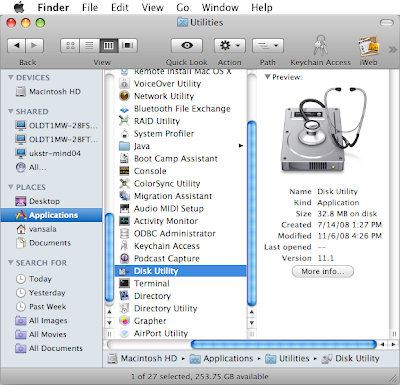
1. Go to Applications & launch Utilities.
2. Under Utilities, open Disk Utility.
3. On this screen, there is list of the Drives attached to the machine.
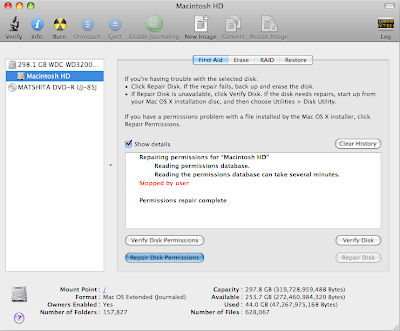
4. Select the hard drive in which application is installed and click on Verify Disk Permissions.
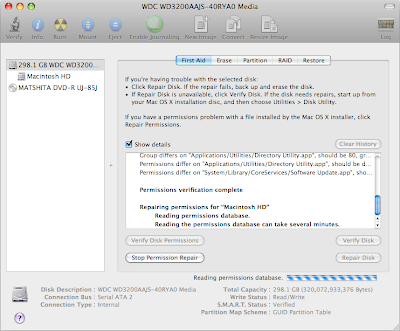
5. Once done, click on Repair Disk Pemissions and this process might take a while so gulp a coke while it finishes.
Once this process is complete restart the machine and then try to launch Entourage and it should work fine.
.
Sometimes it might happen that as soon as you launch Entourages it closes down and not allows you to work. This might happen due to permissions and can be fixed by repairing disk permissions. Here is the process to repair it:

1. Go to Applications & launch Utilities.
2. Under Utilities, open Disk Utility.
3. On this screen, there is list of the Drives attached to the machine.

4. Select the hard drive in which application is installed and click on Verify Disk Permissions.

5. Once done, click on Repair Disk Pemissions and this process might take a while so gulp a coke while it finishes.
Once this process is complete restart the machine and then try to launch Entourage and it should work fine.
.
REBUILDING DATABASE
Rebuild Database process (with images)


e. If there is any MS office program running, it will give you a prompt to close it down.


g. Entourage will bring you back to the same window, this time click on Quit.
SHORTCUT TO LAUNCH REBUILD DATABASE:
Hold the Option key while launching Entourage.
a. The other option to rebuild the database is to first close all the Microsoft applications.
b. Launch Applications (Command+shift+A).
c. Go to 'Microsoft Office 2004' then 'Office' and then open 'Database Utility'.
c. Go to 'Microsoft Office 2004' then 'Office' and then open 'Database Utility'.

d. Select Rebuild Database & click on Continue.

e. If there is any MS office program running, it will give you a prompt to close it down.

f. Once the rebuild process is complete, click on Done.

g. Entourage will bring you back to the same window, this time click on Quit.
Once this process is complete relaunch Entourage. For the very first time your Entourage might take long time depending on the size of your folders and database.
Subscribe to:
Posts (Atom)


 Posts
Posts


